Pay in installments of $6.57 with
 ,
,
 and
and

Shipping Estimate
USA
- USA
- CAN
- USA
- CAN
Ships within 48 hours · Estimated delivery Jul 20 - Jul 25
 Promo Codes Available:
For Your Every Summer RSVP, with Code: SUMMER15
Description
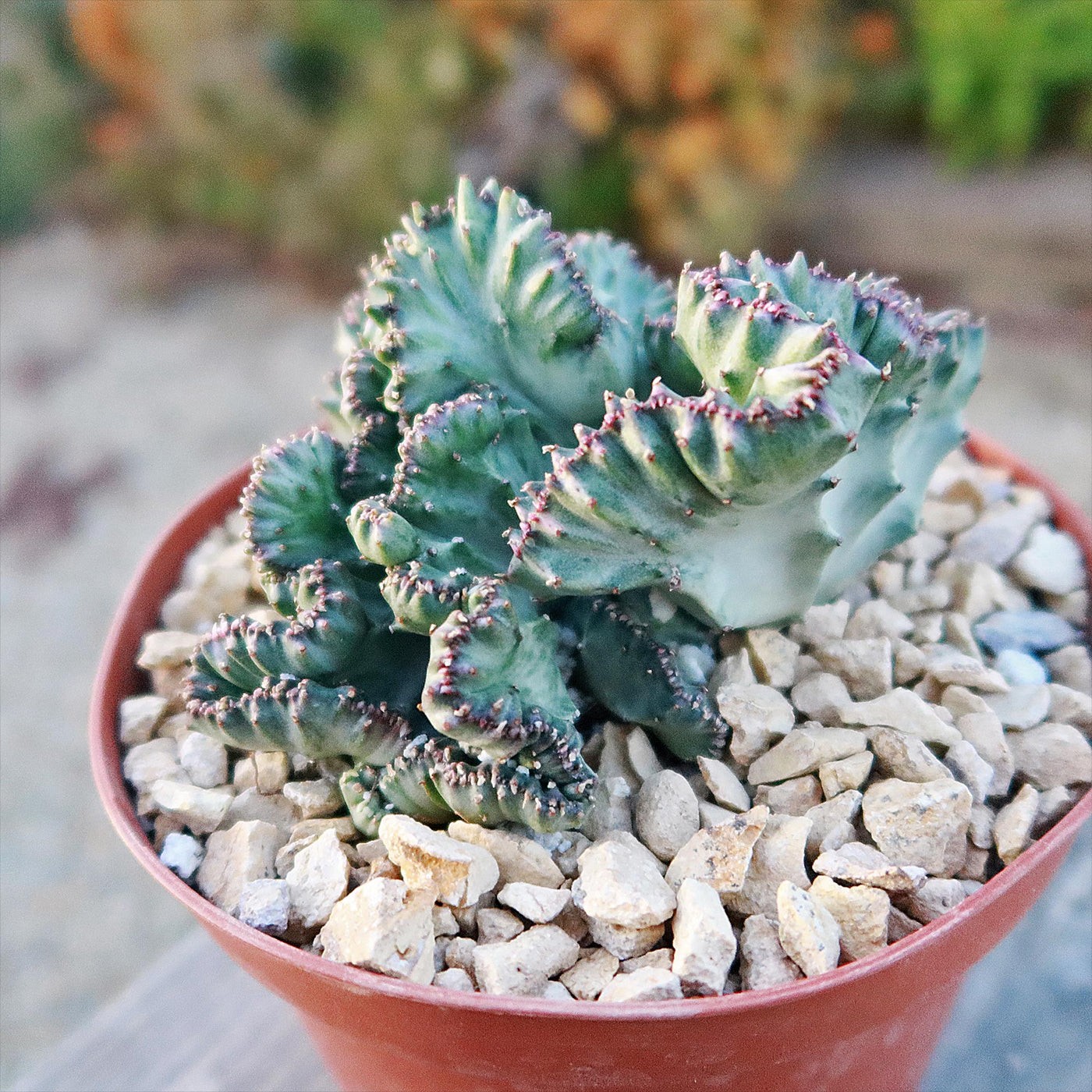
types of coral cactus Shop 'Coral Cactus - Euphorbia lactea cristata'The coral cactus, known as Euphorbia lactea 'cristata' despite its name, isnt a cactus but a unique hybrid of two succulent species. With its striking appearance in shades of green, blue grey, or whitish green, this low maintenance plant is an eye catching and easy to care for houseplant. Hailing from Africa, this fan shaped succulent is sure to make a statement wherever it's planted. It can grow up to 2 feet tall and 16 inches wide. Euphorbia plants
The coral cactus, known as Euphorbia lactea 'cristata' despite its name, isn’t a cactus but a unique hybrid of two succulent species. With its striking appearance in shades of green, blue-grey, or whitish-green, this low-maintenance plant is an eye-catching and easy-to-care-for houseplant.
Hailing from Africa, this fan-shaped succulent is sure to make a statement wherever it's planted. It can grow up to 2 feet tall and 16 inches wide.
Euphorbia plants can probably be successfully grown if you've previously grown any other perennial succulent species.
Furthermore, if you are just starting out, you should know that many succulent species can tolerate neglect. In that situation, a coral cactus is a fantastic option for you.
The coral cactus flowers are small and inconspicuous, typically vibrant pink and purple blooms in the summer and spring. The flowers appear in clusters along the edges of the crested stems, adding a unique touch to this unusual plant.
This drought-tolerant species is low maintenance and easy to care for. These succulents require some initial care, but once established, they are self-sufficient. Contrary to neglect, excessive care and watering often result in the death of succulents.
When and How to Water Your Coral Cactus
This coral cactus plant can withstand droughts and doesn't need to be watered frequently to survive. Let the soil completely dry out between waterings, and if in doubt, give it a little more time before watering again. Less water is needed if living in a humid location and indoor space. Pay attention to how the plant looks and adjust the watering accordingly.
In the spring and summer, during the active growing seasons, water the plant deeply once the top 2 to 3 inches of soil feel dry, typically every 1 to 2 weeks. Ensure the pot has drainage holes to prevent root rot, as coral cacti are highly sensitive to standing water.
In the fall and winter, the plant enters dormancy and requires much less water. You can reduce watering to once every 3 to 4 weeks, or only when the soil is completely dry. Overwatering during this period can cause root rot and damage to the plant.
When watering, always avoid splashing water on the ruffled top (crest), as moisture trapped here can lead to fungal issues. Use a watering can to direct water toward the soil, ensuring thorough hydration without pooling. Monitor your plant for signs of stress—wilting or shriveling leaves indicate underwatering while yellowing or soft stems suggest overwatering. Maintaining a consistent but cautious watering routine is key to keeping your coral cactus healthy.
Light Requirements - Where to Place Your Coral Cactus
When growing indoors, the coral cactus thrives in bright, indirect light, making it perfect for placement near an east- or south-facing window where it can receive 4 to 6 hours of filtered sunlight daily. Direct sun for prolonged periods can scorch the ruffled crest, so diffuse the light using sheer curtains if needed.
Artificial grow lights can also supplement its light needs in rooms with limited natural light. Rotate your plant occasionally to ensure even light exposure and prevent leaning.
For outdoor cultivation, the coral cactus can be placed in a shaded or partially shaded area where it receives morning sunlight and is protected from intense afternoon rays.
A spot with 3 to 4 hours of gentle sun works best, especially during summer.
Direct exposure to harsh sunlight for extended periods can burn the crest and cause discoloration.
If growing outdoors, gradually acclimate the plant to sunlight to prevent shock.
Optimal Soil & Fertilizer Needs
If you're looking to grow some gorgeous crested Euphorbia succulent you'll need to make sure you have the right soil and fertilizers. Instead, make or buy a well-draining potting mix, or ideally use our specialized potting mix that contains over 10 natural substrates and mycorrhizae to promote the development of a strong root system that helps your plants to thrive.
When it comes to fertilizing, remember that less is more. A small amount of NPK fertilizer once a year in spring will do wonders for your plant's health and growth. Using 100% organic fertilizers also ensures that other beneficial compounds and microbes are added to the soil, without the use of harsh chemicals.
Hardiness Zones & More
When growing indoors, coral cacti thrive at consistent temperatures between 60°F to 85°F, which aligns with most typical household conditions. They prefer moderate humidity but adapt well to lower-humidity environments, making them ideal for indoor spaces. Avoid placing the plant near cold drafts, air conditioners, or heaters, as sudden temperature fluctuations can stress the plant. To keep the plant healthy indoors, ensure bright indirect light and avoid overly humid areas like bathrooms unless there is sufficient airflow.
For outdoor cultivation, coral cacti grow well in USDA hardiness zones 10-11, only in specific regions like southern Florida and Hawaii, where the warm, tropical climate matches their needs.
In these regions, the plant can tolerate outdoor humidity levels but still requires protection from heavy rain and extreme sun.
Place it in a spot with partial shade and well-draining soil to prevent root rot. If temperatures drop below 50°F, bring the plant indoors to protect it from cold damage, as coral cacti are not frost-tolerant.
Wildlife - Coral Cactus Attracts the Following Friendly Pollinators
The Coral Cactus can attract pollinators such as bees, butterflies, hummingbirds, and other beneficial insects when it produces small blooms under the right conditions. Its unique crested shape and striking appearance can make it a visually intriguing feature in gardens or patios, drawing in wildlife that helps sustain a balanced ecosystem.
According to ASPCA, ingesting this coral cactus in large amounts can be mildly toxic to humans, cats, and dogs. While it is safe to touch and handle, precautions should be taken to avoid accidental ingestion.
How to Propagate Your Coral Cactus
To propagate your coral cactus, you can take stem cuttings from the plant and allow them to callus over before planting them in well-draining soil. Make sure to keep the cuttings in a warm, bright location and water sparingly until roots develop. You can also propagate your coral cactus by division, separating offsets from the main plant and replanting them in their own containers.
Key Takeaways
- The Coral Cactus thrives in arid conditions and requires minimal watering, making it an ideal choice for low-maintenance gardens and indoor spaces.
- Its striking fan-like, wavy shape resembles coral, giving it a sculptural and artistic appeal that stands out in any setting.
- While it thrives as an indoor plant across most of the United States, it can only grow outdoors in specific regions like southern Florida and Hawaii, where the warm, tropical climate aligns with its natural habitat.
- The Coral Cactus grows well with bright, indirect light and adds a touch of modern elegance to any home or office space.
The Bottom Line
Overall, the Coral Cactus (Euphorbia lactea 'cristata') is a unique and eye-catching plant with its coral-like appearance and crested growth pattern. This succulent requires bright, indirect light and well-draining soil to thrive, making it a low-maintenance option for indoor gardens. With its striking beauty and easy care requirements, the Coral Cactus is sure to be a standout addition to any plant collection.
Shipping Notes
- Free Standard Shipping on $100+ Orders to the USA.
- Except Preorder products are shipped in 48 hours.
- Delivery to the USA:
- Standard Shipping : 3-10 business days
- If time is of the essence, please consider selecting expedited delivery for faster service.
Exchange/Return Notes
- We offer a 30-day return/exchange service after receiving.
- Final sale items are not eligible for returns or exchanges.
- To process your return/exchange, please contact us at [email protected]
- Please click here for more details>>> Return & Exchange Policy